Reducing Bot Traffic & Analytics Noise Using Cloudflare (Free Method)
If you're tracking website traffic in Google Analytics (GA4) or Search Console, you've likely seen spikes from odd sources like China, Germany, or Singapore. These aren't real visitors—they're bots inflating page views, skewing conversion rates, and making your reports unreliable. The good news? You can clean this up using Cloudflare's free plan without touching code or risking your SEO.

This guide walks you through a simple setup that routes your site through Cloudflare's proxy, enables Bot Fight Mode, and adds managed challenges for suspicious traffic. It targets bots while letting legitimate crawlers like Googlebot pass freely.
The Problem: Why Bot Traffic Ruins Your Analytics
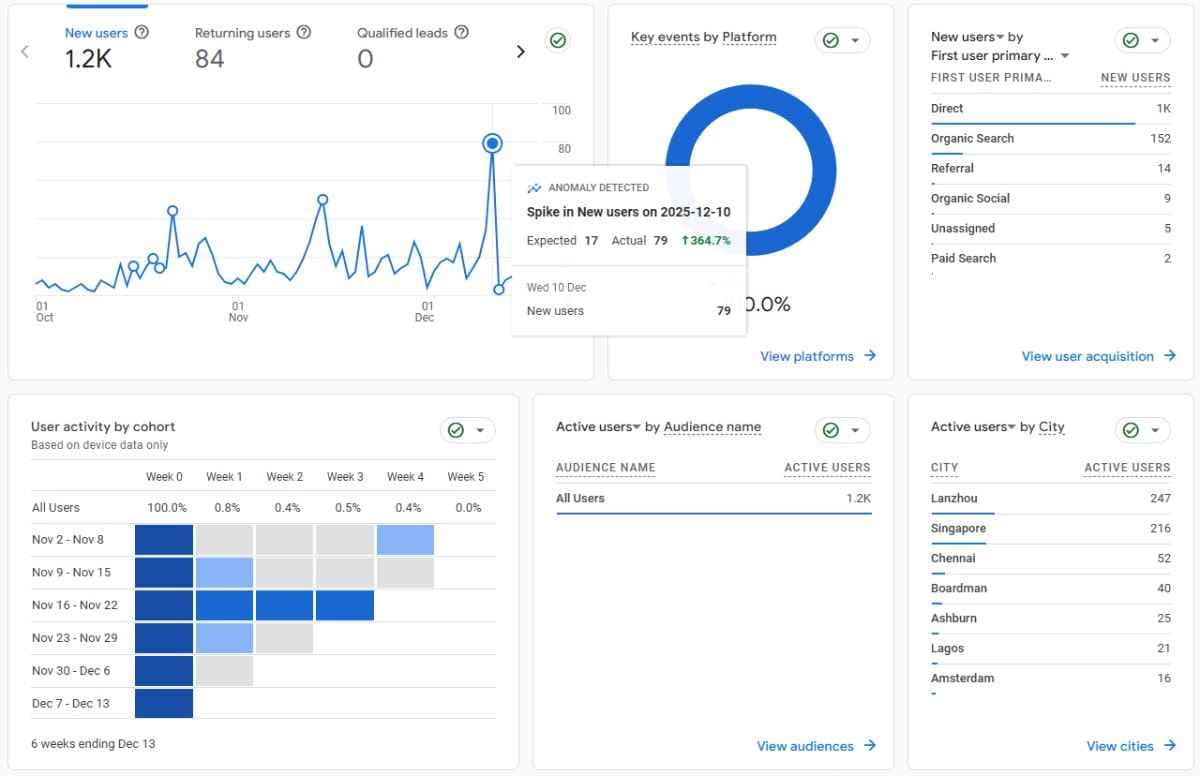
Bots generate fake sessions that look like real traffic but deliver zero value. They boost metrics artificially, hide genuine user behavior, and mislead your marketing decisions. For example, a campaign might seem to underperform because bot noise drowns out actual conversions.
Digital marketers and site owners often spot this in GA4 reports: sudden traffic surges from unfamiliar countries, high bounce rates on every page, or sessions with zero engagement. Search Console shows similar crawler spikes that don't match organic growth.
Without a fix, your data stays noisy. Cloudflare's free tools change that by filtering bots at the edge—before they hit your analytics.
The Solution: Cloudflare Proxy + Bot Fight Mode (All Free)

Cloudflare acts as a protective layer for your site. Its free proxy hides your server from direct attacks and scans incoming traffic. Key features include:
- Bot Fight Mode: Automatically challenges known bad bots.
- Managed Challenges: Custom rules that verify suspicious visitors without blocking everyone.
This setup reduces bot noise by 70-90% in most cases (based on real user reports), while Googlebot, Bingbot, and other search crawlers sail through unaffected.
Step-by-Step Setup: No Developer Skills Needed
Follow these steps to get started. It takes about 15-30 minutes.
Step 1: Add Your Site to Cloudflare and Enable Proxy
- Sign up for a free Cloudflare account at cloudflare.com.
- Click "Add a site" and enter your domain (e.g., example.com).
- Cloudflare scans your DNS records select the correct ones (usually all).
- Cloudflare gives you new nameservers (like ns1.cloudflare.com). Log into your domain registrar (e.g., GoDaddy, Namecheap) and replace your old nameservers with these.
- Back in Cloudflare, go to DNS > toggle the orange cloud icon (proxy status) to Proxied for your main records (A, CNAME for www, etc.). This routes traffic through Cloudflare.
Wait 5-60 minutes for DNS changes to propagate (check with whatsmydns.net).
Step 2: Enable Bot Fight Mode
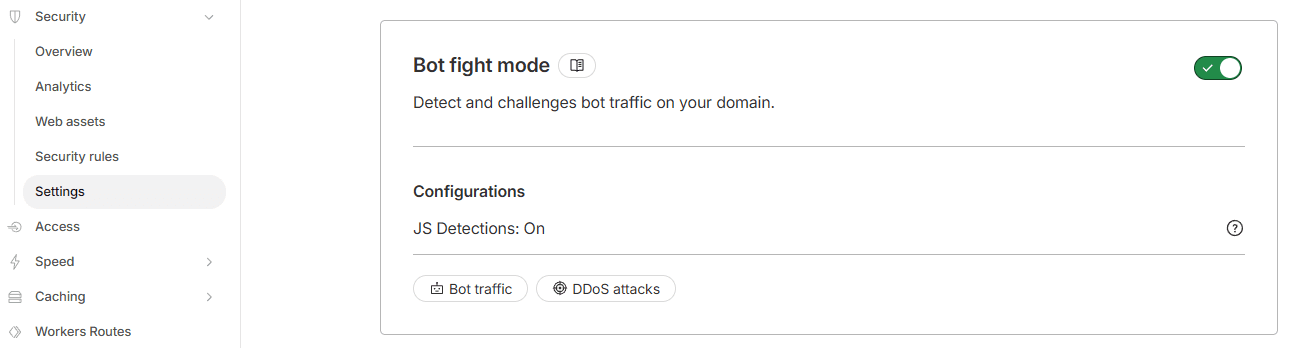
- In your Cloudflare dashboard, go to Security > Settings.
- Toggle Bot Fight Mode to On. That's it this blocks millions of known bots instantly, including those hitting GA4.
Cloudflare maintains a huge database of bad bots and updates it automatically.
Step 3: Create Managed Challenge Rules for Extra Protection
Note: Only for non Indexing domains/url's like dashboards. Adding Managed challenge rule like below would likely de-index pages from google.
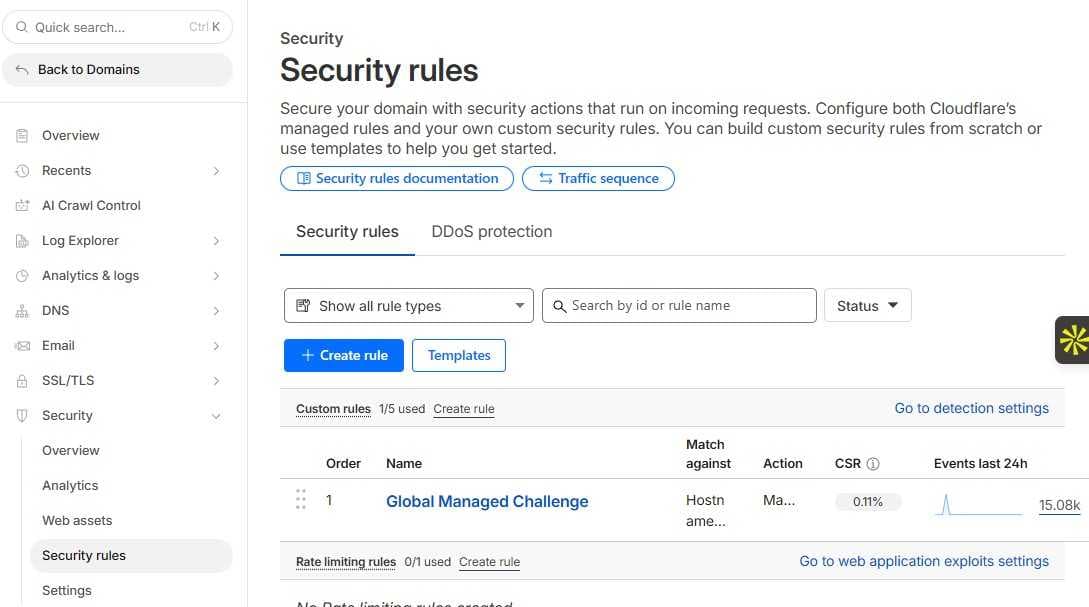
For targeted filtering:
- Go to Security > Security Rules > Create rule.
- Name it "Bot Challenge Rule" or anything that makes sense.
- Under If incoming requests match:
- Field: Hostname
- Operator: wildcard
- Value: * (applies to all paths)
- Add expressions for your domains: example.com/* or www.example.com/*.
- Add conditions for bot-like traffic (pick 1-2 to start):
- User Agent contains "bot", "crawler", or "spider" (but not "Googlebot").
- Country equals high-bot sources (e.g., specific IPs from China bots—but avoid blanket country blocks).
- Or use Bot score less than 10 (Cloudflare's AI risk rating).
- Action: Select Managed Challenge.
- Save and deploy.
Test on a staging site first if possible.
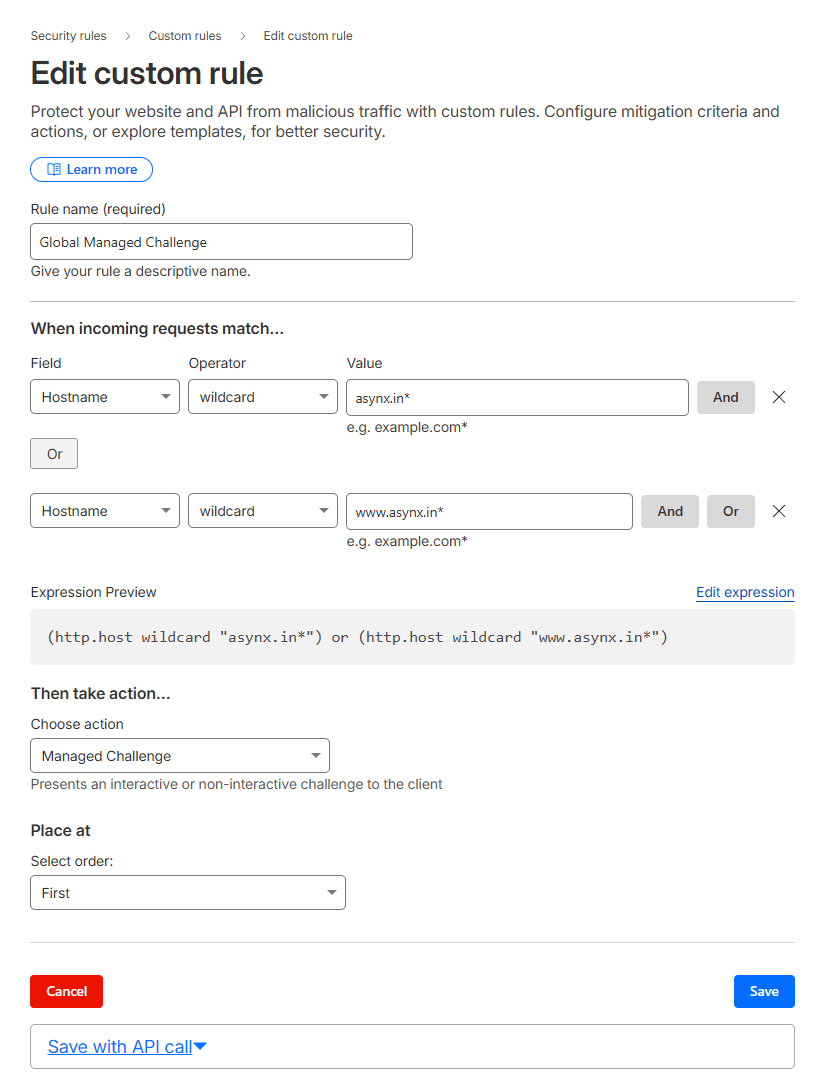
This is how it looks after creating rule:
What Happens with Managed Challenges?
A Managed Challenge is a quick JavaScript test or invisible check that runs in the visitor's browser. Real users:
- Pass instantly (under 1 second, no interruption).
- See your site normally.
Suspicious bots:
- Fail the challenge and get blocked or rate-limited.
- Never reach your server or GA4.
Cloudflare's machine learning analyzes signals like browser behavior, mouse movements, and IP reputation to score traffic (1-99). Scores under 30 trigger challenges bots rarely pass.
Why Googlebot and Legitimate Crawlers Stay Safe
Cloudflare whitelists official search bots:
- Googlebot, Bingbot, and others have verified user agents and IP ranges.
- They bypass challenges entirely.
- Your SEO rankings remain untouched many sites report improved crawl efficiency post-setup.
No risk to organic traffic.
Before vs. After: Real Results in Your Analytics
Aspect | Before Cloudflare | After Setup |
|---|---|---|
Page Views | Inflated by 50-200% from bots | Drops to real levels (e.g., -80%) |
Sessions | Fake spikes from China/Singapore | Clean, matches organic sources |
Bounce Rate | 90%+ on bot pages | Realistic 40-60% for humans |
Conversions | Skewed low by noise | Accurate, actionable insights |
GA4 Reports | Unreliable trends | Trustworthy data for decisions |
Users often see changes within 24 hours. Monitor GA4's real-time reports during rollout.
Ready to Clean Your Analytics?
This free Cloudflare setup gives you reliable GA4 data fast. Start today, track the difference in a week, and make better marketing calls.
Need help with setup or custom rules? Contact us for a quick consultation we guide non-technical teams daily.